
Unveiled on October 31, 2024, Canopsis 24.10 takes stability, performance and ergonomics up a notch. Firmly focused on technical aspects, this version is aimed at both demanding administrators and users looking for responsiveness and flexibility.
Ready to discover all the new features of Canopsis 24.10.0? Let’s get started!
🔴 Event recording: a graphical tool for analyzing the RabbitMQ bus
Exclusive to Canopsis 24.10 Pro
Canopsis 24.10.0 introduces a brand-new, highly practical feature for administrators: Event Logging.
This intuitive graphical interface lets you capture, visualize and replay raw events circulating in Canopsis in the blink of an eye!
This module is an ergonomic “no code” alternative to the Amqp2tty command-line tool, simplifying analysis, functional testing and business scenario demonstrations.
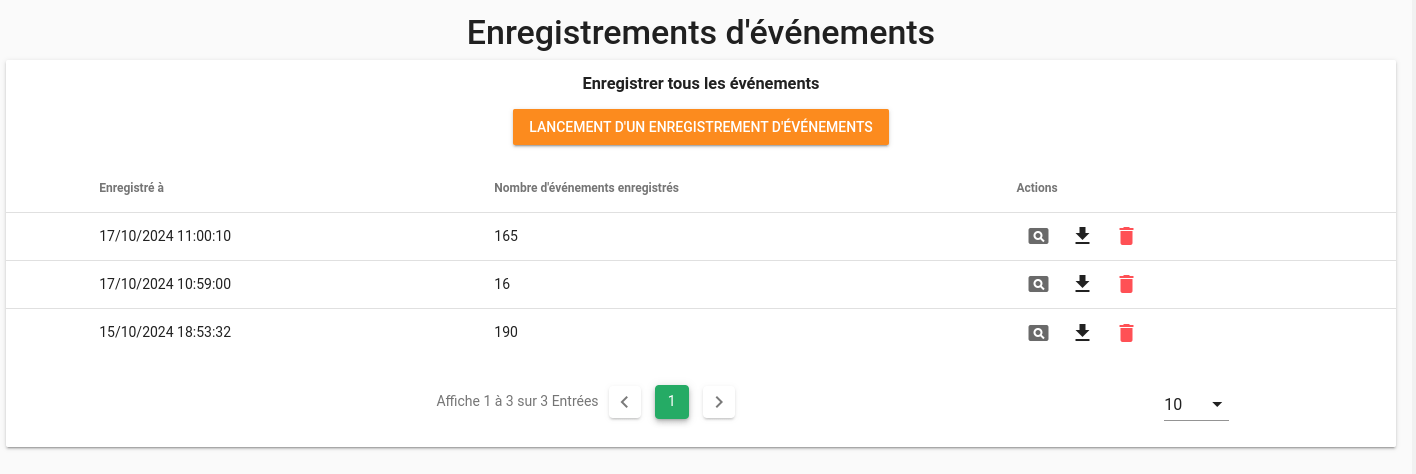
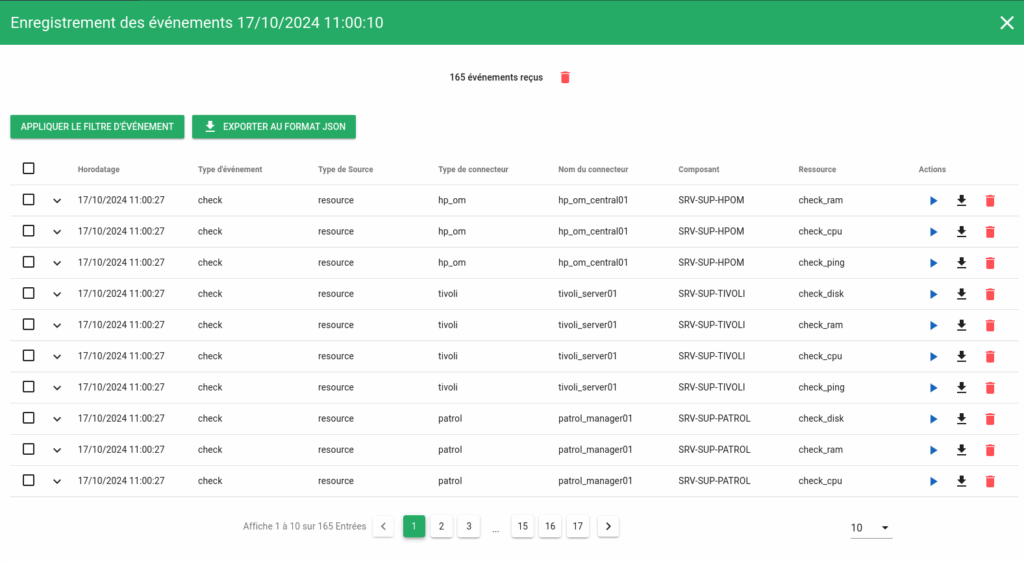
From this WebuiAMQP2TTY, you can:
- Replay one or more events individually or in groups (ideal for testing motors or correcting errors)
- On-the-fly recording of event traffic passing through Canopsis
- View history of previous recordings
- Explore each event in detail (type, payload, timestamp…)
- Apply precise filters to event type or content
- Export results in JSON format for later archiving and analysis
- Easily delete a recording or targeted events
In short, the Event Logging feature lets you view and analyze Canopsis events in real time, without a command line!
🩹 Support tool: a module directly integrated into the solution
Exclusive to Canopsis 24.10 Pro
When a support case arises on an environment, Canopsis 24.10.0 will save you precious time thanks to our new help module! In the event of a glitch, the support tool can automatically :
- Export MongoDB and TimescaleDB data, technical metrics and RabbitMQ-specific indicators
- Present the data collected in the form of Grafana dashboards
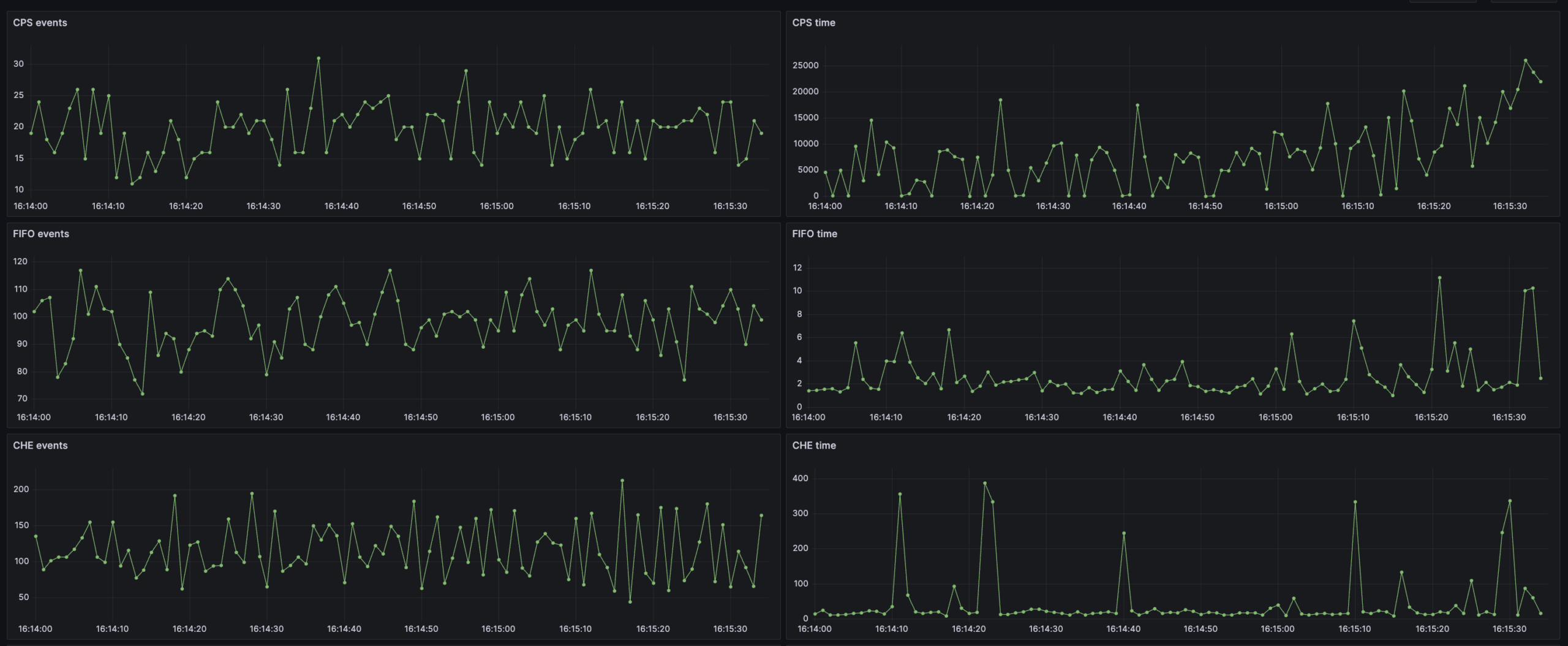
In short, the Support Tool makes it quick and easy to deal with a problem with Canopsis support!
📈 Technical Metrics: now enabled by default
Exclusive to Canopsis 24.10 Pro
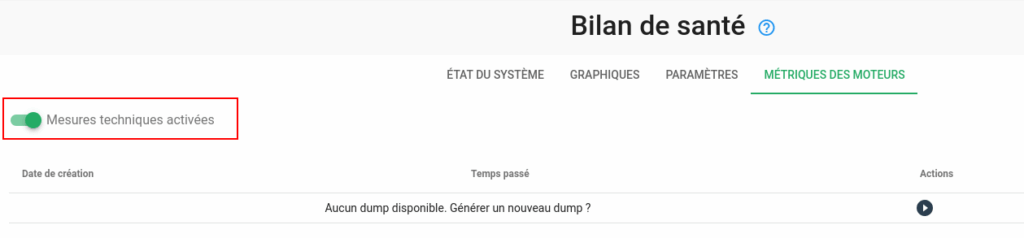
In Canopsis 24.10.0, reference environments natively integrate the collection of technical metrics. Configurations include the creation of the database and the associated user.
Activation and deactivation are performed from the Healthcheck module:
🔗 Link Generator 2.0: Autocomplete added to advanced editor
Available on Canopsis 24.10 Community and Pro
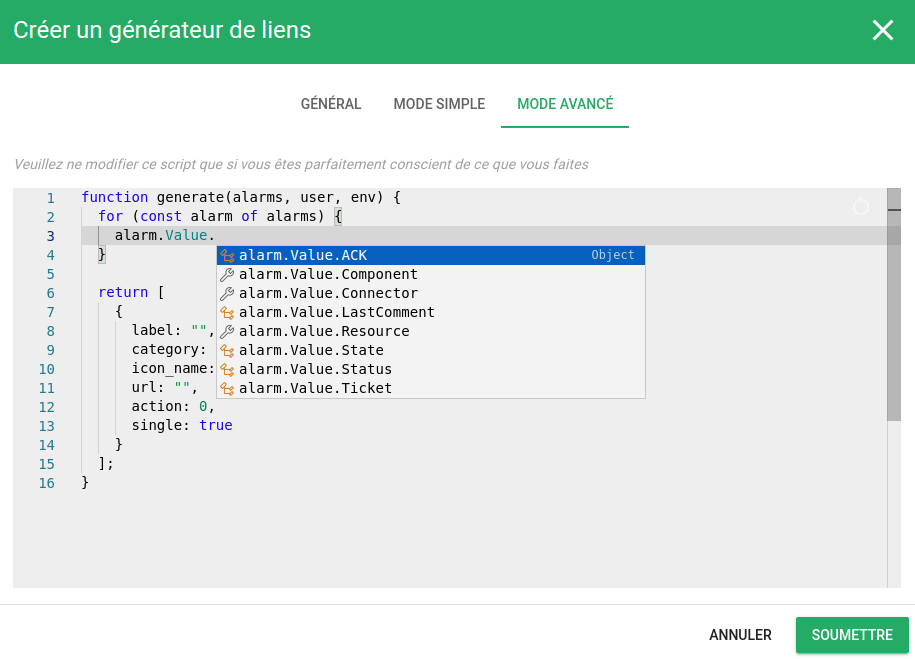
Canopsis 24.10.0 adds an advanced JavaScript editor to the link generator. It now offers intelligent autocompletions for:
- Les variables associées à l’alarme ciblée par le générateur de liens, notamment “alarm.Entity.xx” et “alarm.ExternalData.xx”,
- Variables linked to the link manager user,
- Environment variables extracted from the “canopsis.toml” file.
⚙️ Enhanced components and enriched engines in Canopsis v24.10: only for the most advanced users
🪜 Version upgrades on Canopsis 24.10 :
| Tool concerned | Version | Version in Canopsis 24.10 |
|---|---|---|
| MongoDB | 7.0.8 | 7.0.14 |
| TimescaleDB | 2.14.2 | 2.15.1 |
| PostgreSQL | 13 | 15 |
🗝️ Global improvements in Canopsis 24.10 :
- Defining custom units in “canopsis.toml”
- Assign a unique name to each instance, visible in the logo tooltip
- Example of a “canopsis.toml” overload file added to the reference environment
🧩 UIimprovements in Canopsis 24.10:
- The application title can now be defined using the HTML editor
- New Handlebars helpers: badge map, advanced tag management
- Alarm list:
- CSV export of selected alarms possible
- Correlation now enabled by default
- Add an action to define periodic behavior quickly
- Patterns:
- The filter editor can now act on meta alarms
- Event type values are no longer translated to avoid confusion
- Service weather: Tile behavior can be set when no action is required
- Planning: Add the ability to predefine the name of periodic behaviors
- Counters: the “Unack” counter is now available in the counters list
- Healthcheck: all event types can be selected in the graphs of the fifo engine
✅ In conclusion: why switch to Canopsis v24.10?
Designed for demanding environments, Canopsis v24.10 combines technical power, responsiveness and flexibility for experienced administrators and advanced users alike.
With two major updates a year, Canopsis is constantly evolving to offer you even more hypervision features. Canopsis 24.10 introduces three new features in its Pro version: event logging, the support tool and technical metrics.
Faithful to the values of Free and Open Source software, we are also committed to developing our community version. That’s why the 2.0 link management module is now available on Canopsis 24.10 Community Edition and Pro Edition.
🎯 If you are a user of previous versions, migration to Canopsis 24.10 is highly recommended in order to take full advantage of Canopsis advances! Need help with your migration project? We’re here to help.
🚀 Want to take the plunge with Canopsis 24.10 and discover the market’s first open-source hypervision solution? You can test our demo on your own and schedule a presentation with our technical sales team.
For more information, take a look at the complete documentation and the migration guide! We’re also available via the contact form to answer any outstanding questions you may have.
See all Canopsis news.