
Canopsis v26.04 marks a turning point. After 15 years of developing its open-source, sovereign hypervision platform, we’re bringing artificial intelligence to Canopsis. This release introduces two major new features: an anomaly detection service and a chatbot, a conversational AI assistant built directly into the interface.
And that’s exactly what we’re going to talk about today!
The Canopsis chatbot: What exactly is it?
The Canopsis chatbot is a virtual conversational agent. You can access it directly from the interface, with no external modules to install. It’s a Canopsis Pro exclusive!
In fact, it’s based on a large language model (LLM) service. In this first version, Canopsis works with Google’s Gemini service.
To date, the first version of the Canopsis chatbot focuses on one specific mission: helping users create, modify, validate, and correct patterns. These are the filters that structure how Canopsis processes alarms, entities, and periodic behaviors.
How does Canopsis’s AI assistant work?
Until now, configuring a pattern in Canopsis meant knowing the right fields, the available operators, and the logic specific to each rule type. With the Canopsis chatbot built into version v26.04, that hurdle is gone! All you have to do is describe your need in natural language. The assistant understands your intent, translates it into a pattern, and selects the right fields and operators on its own.
The AI panel appears automatically in every window that contains a pattern editor. In practice, this covers a wide range of contexts, such as:
- widget filters,
- event filter rules,
- idle rules,
- flapping rules,
- scenarios,
- periodic behaviors,
- services,
- KPI filters,
- remediation instructions,
- dynamic information…
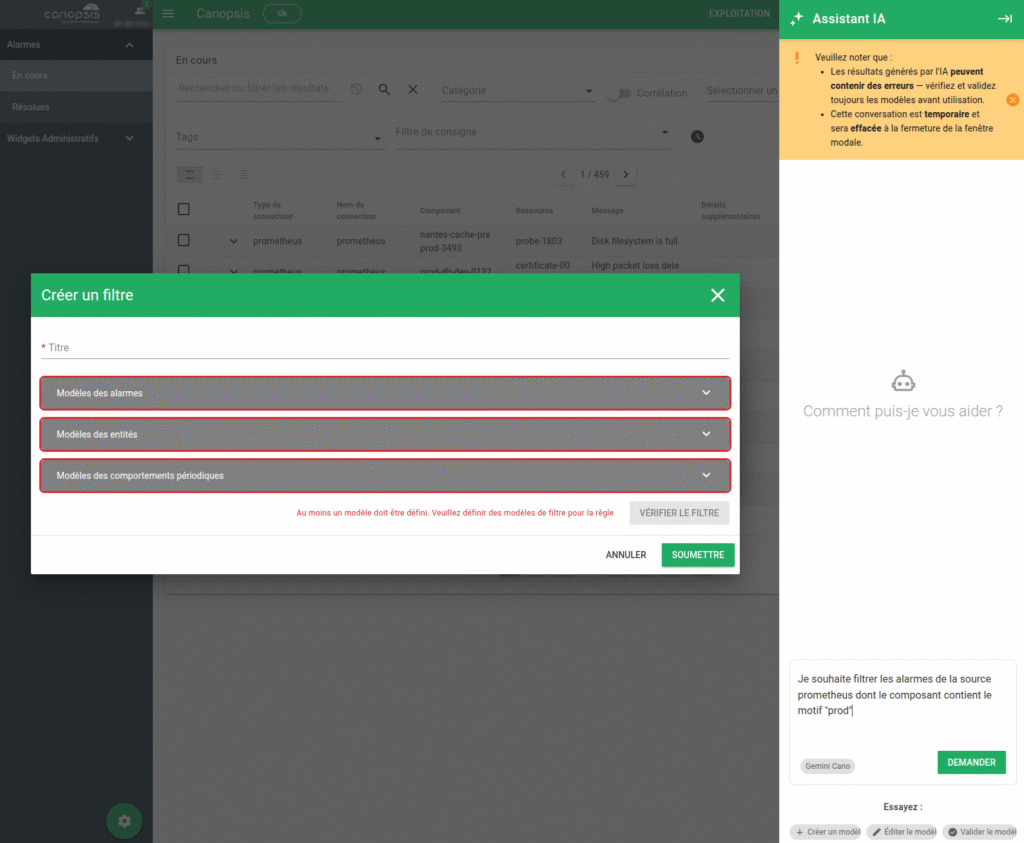
Three quick-action buttons are available:
- Create a template: to start from scratch
- Edit the pattern: to modify an existing pattern
- Validate the model: to check and correct an existing JSON file
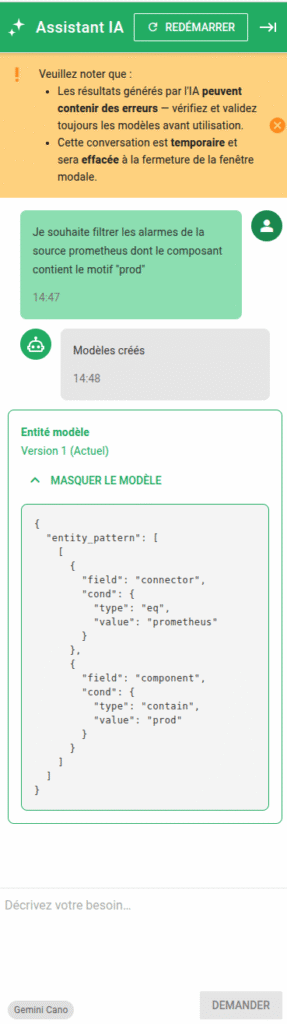
Once you make a request, the assistant generates a response and creates a version of the pattern. Every suggestion is saved in the conversation history, so you can go back to a previous suggestion or compare different approaches.
What’s more, if the chatbot detects invalid JSON in the advanced editor, a “Correct the model with AI” button appears. In short, the assistant analyzes the problem and suggests a fix with a single click.
As for configuration, the assistant uses Google’s Gemini models, which you can set up via the interface: Administration → Custom Objects → LLMs. If you enable multiple models, a selector lets you choose which one to use during a session.
What are the benefits of the Canopsis chatbot?
Converse in natural language
This benefit goes further than it seems. It’s not just about simplifying a technical step: it removes an entire barrier to entry. An application manager, an experienced user, or a newcomer to the team can now create or modify a filter independently, in natural language, without relying on an administrator.
Save time
Thanks to free-form text entry and quick actions, you can draft and send a prompt in just a few seconds. Then, if the response doesn’t quite meet your expectations, you can correct it without starting from scratch, using the conversation history as a guide.
Ensure digital sovereignty
Connecting the agent to your own LLM, or to a third-party API, ensures compliance with each organization’s security and sovereignty requirements. This is essential for sensitive environments, particularly in the public sector or critical infrastructure.
Provide full traceability
The session history is stored on the server. You can access it from the Administration → Custom Objects → LLMs menu, via a “Chat History” modal. This view displays the entire conversation, including sent prompts, responses, manual edits, and prompt-related errors.
Real-world use cases
For a Canopsis administrator, the chatbot simplifies the creation of complex rules. For example, it can define an event filter that targets a specific category of entities with multiple nested conditions: “I want to target all Cisco devices in Lille with a criticality level higher than Major, except those belonging to the Network department.”
For an application manager, the chatbot makes it possible to configure patterns without prior technical training. In short, it lowers the barrier to entry for less experienced users.
For teams new to Canopsis, the assistant acts as a guide. It suggests, corrects, and explains its understanding of the request.
What Canopsis 26.10 has in store for the Chatbot
The first version of the Canopsis chatbot focuses on patterns. But this is just a starting point, version 26.10 will introduce several major updates!
First, a search assistant for pilots: you’ll be able to enter search queries in natural language in the alarm list, with no need to master any specific technical syntax.
Next, we’re implementing MCP (Model Context Protocol), an open standard that lets AI assistants connect to external tools and data in a standardized way. Applied to Canopsis, this will pave the way for direct interactions between the AI and the platform: querying the alarm list, triggering an action, retrieving information… All using natural language.
Finally, multi-LLM compatibility will let you freely choose which AI assistant to interact with: Gemini, as well as other models, including on-premises LLMs. This is a decisive advantage for organizations with strict requirements around data sovereignty and security.
In summary
The Canopsis chatbot represents a transformative development for our solution, and for open-source hypervision as a whole. It simplifies access to the most technical features, reduces the cognitive load on teams, and opens up the platform to new types of users.
With the updates planned for October 2026, it’s set to become a true companion for every activity in Canopsis.
Do you have a Canopsis project in mind? Contact us, let’s talk about it!