
When the alarm leaves the hypervision console and arrives where the teams are working…
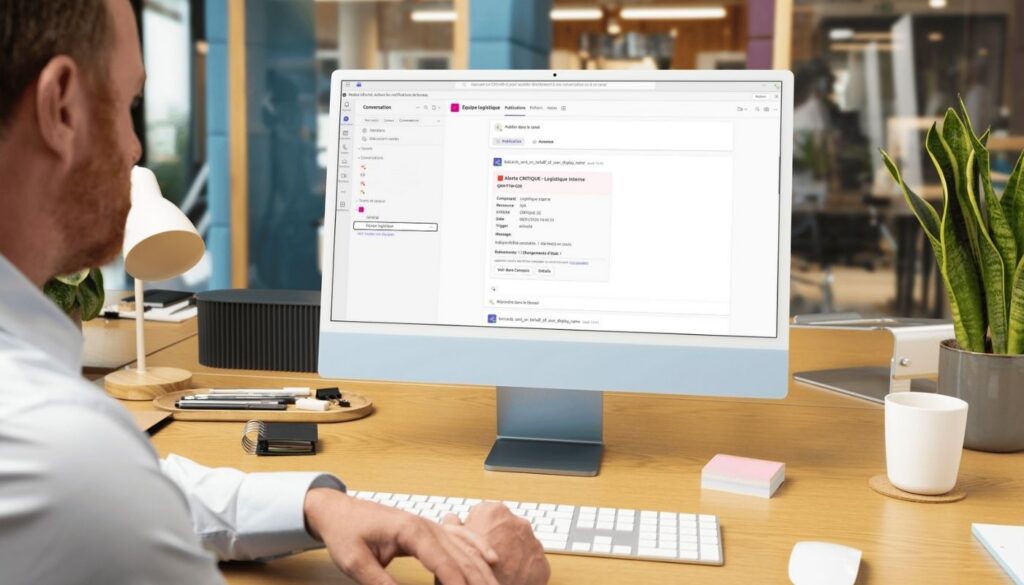
In most organizations, monitoring tools are primarily consulted by operating pilots, whose role is precisely to monitor the hypervisor console. But once an incident has been detected, resolution does not depend on them alone. Very often, it involves business teams working mainly on collaborative tools such as Microsoft Teams.
This is precisely where the interconnection with Microsoft Teams + Canopsis comes into its own! It takes the alarm out of the hypervision solution and brings it to the right audience, in the right context.
Why connect Teams and Canopsis?
The aim here is not to replace the Canopsis console, but to complement our hypervision system. The pilots continue to monitor, correlate and analyze alarms, while the business teams receive information tailored to their needs: clear, contextualized and comprehensible notification, directly in their Teams channel.
Each alarm can thus be presented with a legible severity level, an identifiable business component, an explicit message and useful contextual information for decision-making.
Teams notification designed for non-technical teams
Thanks to Teams adaptive cards, alerts are no longer just plain messages! It becomes a communication medium with :
- a visual banner according to criticality,
- key information at a glance,
- and access to details for those who need them.
Business teams can therefore quickly understand what’s going on, without having to master the subtleties of Canopsis.
Simple, controlled integration… on both sides!
On the Teams side, integration is based on Power Automate workflows, which can receive and display interactive maps.
On the Canopsis side, a scenario triggers the notification to be sent at the right time, according to the rules defined by the organization.
A concrete example: notification of a “Logistics” department
In this example, we use a Canopsis service dedicated to logistics to represent a clear business perimeter. This service aggregates several technical sources and is enriched with information that can be understood by operational teams: description, type of service, status, internal codes or functional perimeters.
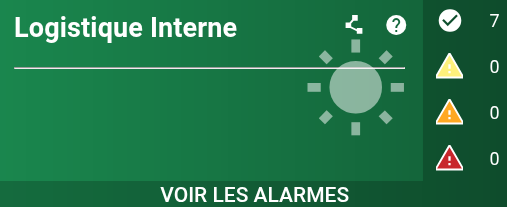
We then configure a Canopsis scenario to react to the “Alarm activation” trigger: the payload is available in the appendices.
When an alarm is activated on the “Logistics” service, the scenario runs automatically and sends an adaptive map to the dedicated Teams channel: the Teams configuration method is also available in the appendix.
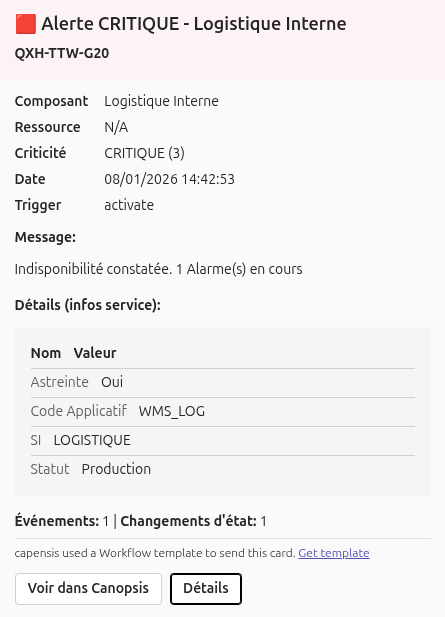
The notification received by business teams focuses on the essentials:
- a banner clearly indicating criticality and the name of the department concerned
- a summary message describing the situation (for example, the number of critical alerts in progress)
- a button to access Canopsis for authorized users
- a “Details” button giving access, on request, to enriched service information in tabular form, to contextualize the alert without weighing down the main message
Thanks to this mechanism, information is no longer confined to the hypervision console. It flows directly into the Teams channel, where business teams collaborate, make decisions and coordinate their actions. Pilots retain operational control within Canopsis, while business teams gain greater visibility and responsiveness.
To conclude on the interconnection between Teams and Canopsis
In conclusion, the integration between Microsoft Teams and Canopsis is a perfect illustration of modern hypervision, geared towards collaboration and operational efficiency. By bringing the alarm out of the hypervision console and directly into the daily work of business teams, Canopsis reduces silos and accelerates decision-making.
In this way, pilots retain complete control over Canopsis, while business teams receive clear, contextualized and immediately usable information, without having to rely on specific technical expertise. Everyone acts at their own level, with the right tools.
This interconnection transforms Teams notification into a real coordination lever. It brings teams closer together, facilitates exchanges and contributes directly to reducing incident resolution times.
If you’d like to find out more, the Canopsis documentation details all the mechanisms presented, and our teams are available to help you implement this integration (and many others!) within your organization.
Appendices
The Canopsis scenario payload
{
  "type": "message",
  "attachments": [
    {
      "contentType": "application/vnd.microsoft.card.adaptive",
      "content": {
        "$schema": "http://adaptivecards.io/schemas/adaptive-card.json",
        "version": "1.4",
        "type": "AdaptiveCard",
        "body": [
          {
            "type": "Container",
            "bleed": true,
            "spacing": "None",
            "style": "{{ if eq .Alarm.Value.State.Value 3 }}attention{{ else if eq .Alarm.Value.State.Value 2 }}warning{{ else if eq .Alarm.Value.State.Value 1 }}accent{{ else }}good{{ end }}",
            "selectAction": {
              "type": "Action.OpenUrl",
              "url": "{{ .Env.CanopsisURL }}/alarms/{{ .Alarm.ID }}"
            },
            "items": [
              {
                "type": "TextBlock",
                "size": "Large",
                "weight": "Bolder",
                "wrap": true,
                "text": "{{ if eq .Alarm.Value.State.Value 3 }}🟥 Alerte CRITIQUE{{ else if eq .Alarm.Value.State.Value 2 }}🟧 Alerte MAJEURE{{ else if eq .Alarm.Value.State.Value 1 }}🟨 Alerte MINEURE{{ else }}🟩 Fin d'alerte{{ end }} - {{ .Entity.Name }}"
              },
              {
                "type": "TextBlock",
                "wrap": true,
                "spacing": "Small",
                "text": "**{{ .Alarm.Value.DisplayName }}**"
              }
            ]
          },

          {
            "type": "FactSet",
            "facts": [
              { "title": "Composant", "value": "{{ .Entity.Name }}" },
              { "title": "Ressource", "value": "{{ if .Alarm.Value.Resource }}{{ .Alarm.Value.Resource }}{{ else }}N/A{{ end }}" },
              {
                "title": "Criticité",
                "value": "{{ if eq .Alarm.Value.State.Value 3 }}CRITIQUE (3){{ else if eq .Alarm.Value.State.Value 2 }}MAJEURE (2){{ else if eq .Alarm.Value.State.Value 1 }}MINEURE (1){{ else }}OK (0){{ end }}"
              },
              { "title": "Date", "value": "{{ .Alarm.Value.LastUpdateDate | localtime "02/01/2006 15:04:05" "Europe/Paris" }}" },
              { "title": "Trigger", "value": "{{ .AdditionalData.Trigger }}" }
            ]
          },

          { "type": "TextBlock", "text": "**Message:**", "wrap": true },
          { "type": "TextBlock", "text": "{{ .Alarm.Value.Output | replace "\n" "\n\n" }}", "wrap": true },

          { "type": "TextBlock", "id": "details_title", "text": "**Détails (infos service):**", "wrap": true, "isVisible": false, "spacing": "Medium" },

          {
            "type": "Container",
            "id": "details_block",
            "isVisible": false,
            "style": "emphasis",
            "items": [
              {
                "type": "ColumnSet",
                "spacing": "None",
                "columns": [
                  {
                    "type": "Column",
                    "width": "auto",
                    "items": [
                      { "type": "TextBlock", "text": "**Nom**", "wrap": true }
                    ]
                  },
                  {
                    "type": "Column",
                    "width": "stretch",
                    "items": [
                      { "type": "TextBlock", "text": "**Valeur**", "wrap": true }
                    ]
                  }
                ]
              }

              {{ if .Entity.Infos }}
              {{ range $k, $info := .Entity.Infos }}
              ,
              {
                "type": "ColumnSet",
                "separator": true,
                "spacing": "Small",
                "columns": [
                  {
                    "type": "Column",
                    "width": "auto",
                    "items": [
                      {
                        "type": "TextBlock",
                        "text": "{{ $k }}",
                        "wrap": true,
                        "isSubtle": true
                      }
                    ]
                  },
                  {
                    "type": "Column",
                    "width": "stretch",
                    "items": [
                      {
                        "type": "TextBlock",
                        "text": "{{ $info.Value }}",
                        "wrap": true
                      }
                    ]
                  }
                ]
              }
              {{ end }}
              {{ else }}
              ,
              {
                "type": "TextBlock",
                "text": "Aucune information enrichie disponible.",
                "wrap": true,
                "isSubtle": true
              }
              {{ end }}
            ]
          },

          {
            "type": "TextBlock",
            "text": "**Événements:** {{ .Alarm.Value.EventsCount }} | **Changements d'état:** {{ .Alarm.Value.TotalStateChanges }}",
            "wrap": true,
            "spacing": "Medium"
          }
        ],

        "actions": [
          {
            "type": "Action.OpenUrl",
            "title": "Voir dans Canopsis",
            "url": "{{ .Env.CanopsisURL }}/alarms/{{ .Alarm.ID }}"
          },
          {
            "type": "Action.ToggleVisibility",
            "title": "Détails",
            "targetElements": [ "details_title", "details_block" ]
          }
        ]
      }
    }
  ]
}
The configuration method in Teams
1. Go to the “Workflow ” section of the channel in which you wish to publish notifications.
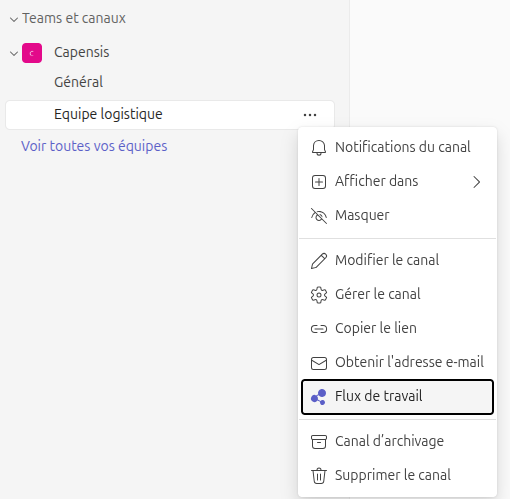
2. Choose “Send webhook alerts to a channel”.
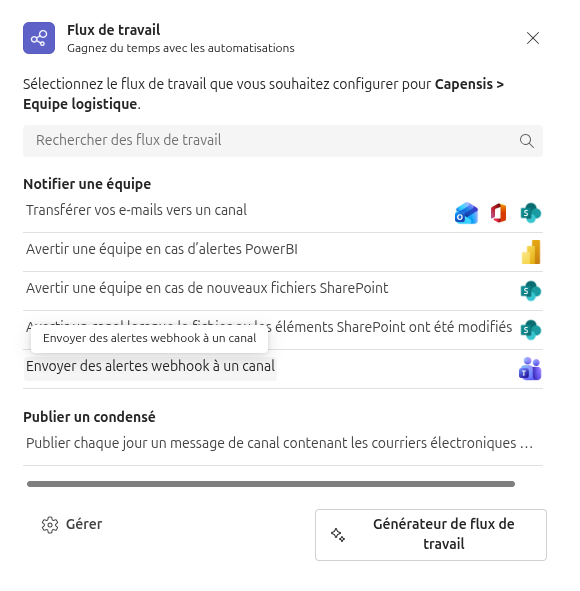
3. Note the webhook URL just created. It will be transferred to the Canopsis scenario