The job manager gives Canopsis unprecedented visibility and control over the execution of technical processes linked to instructions, webhooks, tickets and authentication tokens.
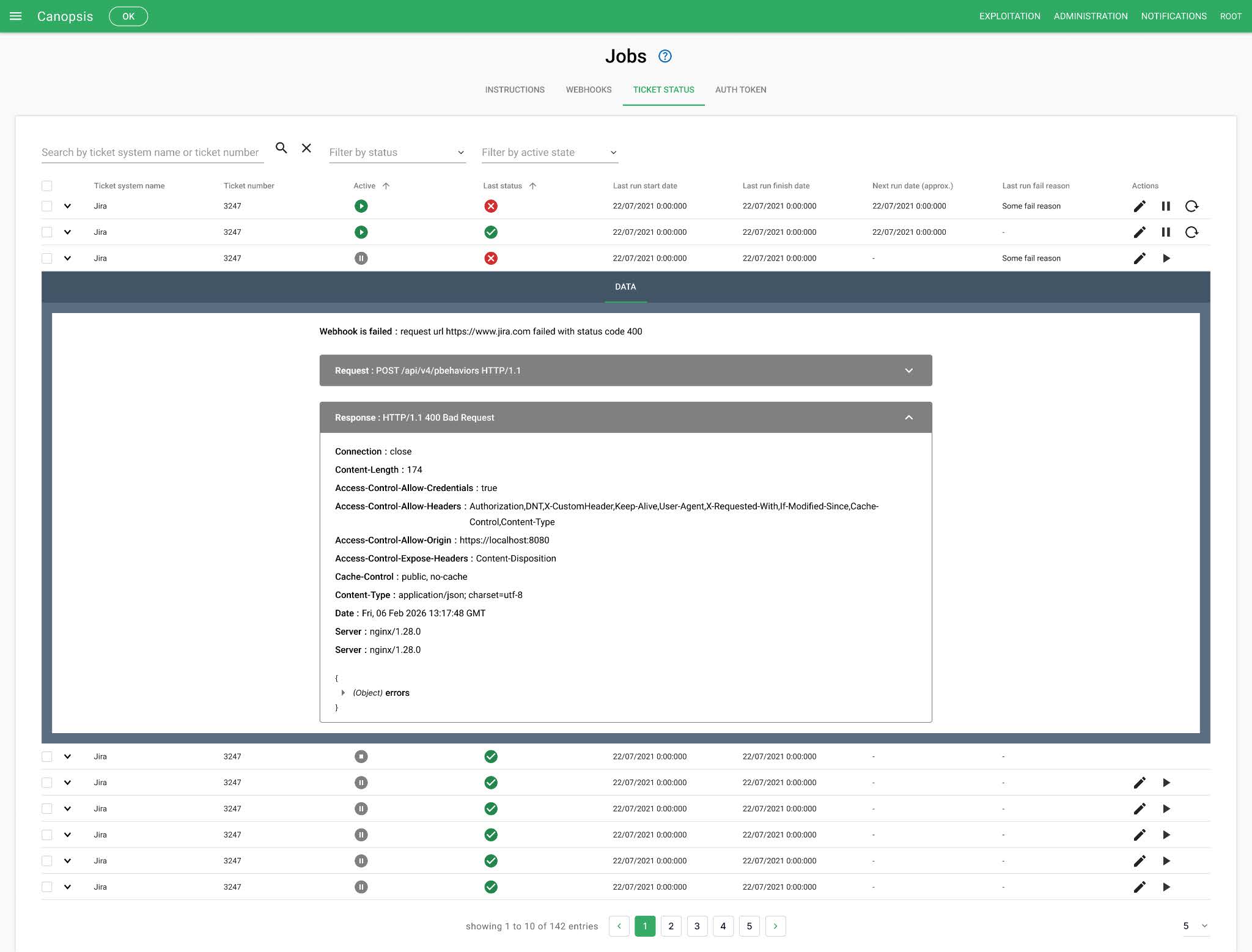
This new space centralizes all jobs – in progress or completed – and enables you to track their precise status:
- in progress,
- failed,
- interrupted,
- or successful.
Each job manager tab offers a detailed view with start and end dates, causes of failure, advanced filters and intelligent sorting to immediately identify priority processing. Administrators can also consult the details of a job, and view the last request sent, as well as the response received, facilitating analysis and diagnosis in the event of an error.
But that’s not all! The Canopsis job manager also lets you :
- discontinuation of current treatment,
- manual dunning,
- pause,
- restart or change configuration for ticket status checks.
Mass actions are now available in the job manager to speed up day-to-day operations.
The result: better control of flows, reduced impact in the event of an incident, and significant time savings for operations teams!
For more information on the features of our open-source hypervision solution, including the job manager, please refer to the Canopsis documentation or to the article dedicated to Canopsis 26.04. Any unanswered questions? You can also contact our technical team via the contact form.