
When you use Canopsis in an advanced way, you inevitably write templates. To enrich alarms, generate dynamic links, feed tickets, adapt scenarios… The problem is rarely writing the template; the problem is testing it! Well, the new Template Studio is here to help.
For a long time, validating a template meant:
- wait for a real event to happen,
- cobble together a temporary scenario,
- test directly in a rule,
- correct, redeploy and retest.
In short, a slow, uncomfortable loop. The Template Studio feature was designed to do just that!
Template studio: A place to write, test and understand what we do
The Template Studio lets you work on a template in a dedicated environment, with:
- controlled test data
- immediate rendering
- a better understanding of the structures used
- the ability to iterate quickly
In this way, we can check:
- that fields really do exist
- that conditions are working as expected
- that the final rendering corresponds to the intended use
No need to wait for an incident or modify an active rule.
A real gain in integration cycles!
In practice, templates are everywhere in Canopsis:
- alarm enhancement
- generation of payloads for external tools
- building documentation links
- message formatting
- automations
Each modification can have an immediate impact on operations. Templates Studio reduces the time between idea and validation. You can test several variants, understand data behavior, and make changes reliable before deployment.
This is particularly useful:
- during the project phases
- when several teams are working on the configuration
- to capitalize on existing models
Fewer production side-effects
A poorly validated template can lead to:
- wrongly filled tickets
- incomprehensible notifications
- scenarios that don’t trigger
- erroneous enrichment
The Template Studio doesn’t eliminate errors, but it does allow you to see them sooner. So we’re moving away from opportunistic testing towards more controlled validation.
Template Studio: a simple, yet structuring feature
Template Studio is not a technical revolution. Rather, it’s an enhancement to the operating experience.
It makes templating:
- clearer
- more testable
- more reproducible
Above all, it allows you to work with greater peace of mind on sensitive configurations.
Practical example
We want to implement a ticket declaration rule on the Service Now tool. By browsing the Service Now API documentation, you’ll find an example of a ticket creation response.
We then create a response model in Canopsis by transferring the previous example to it:
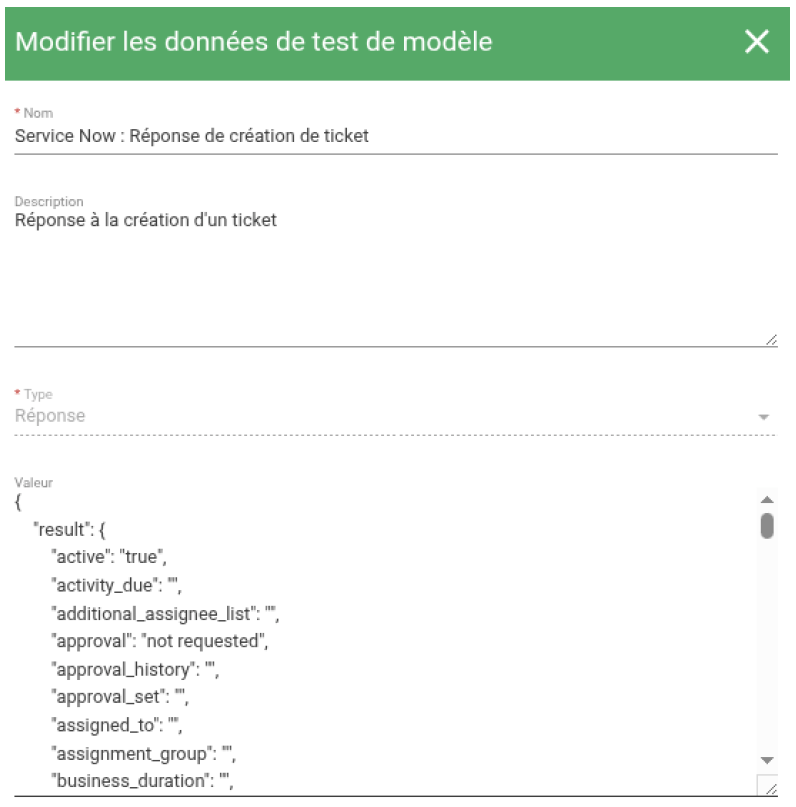
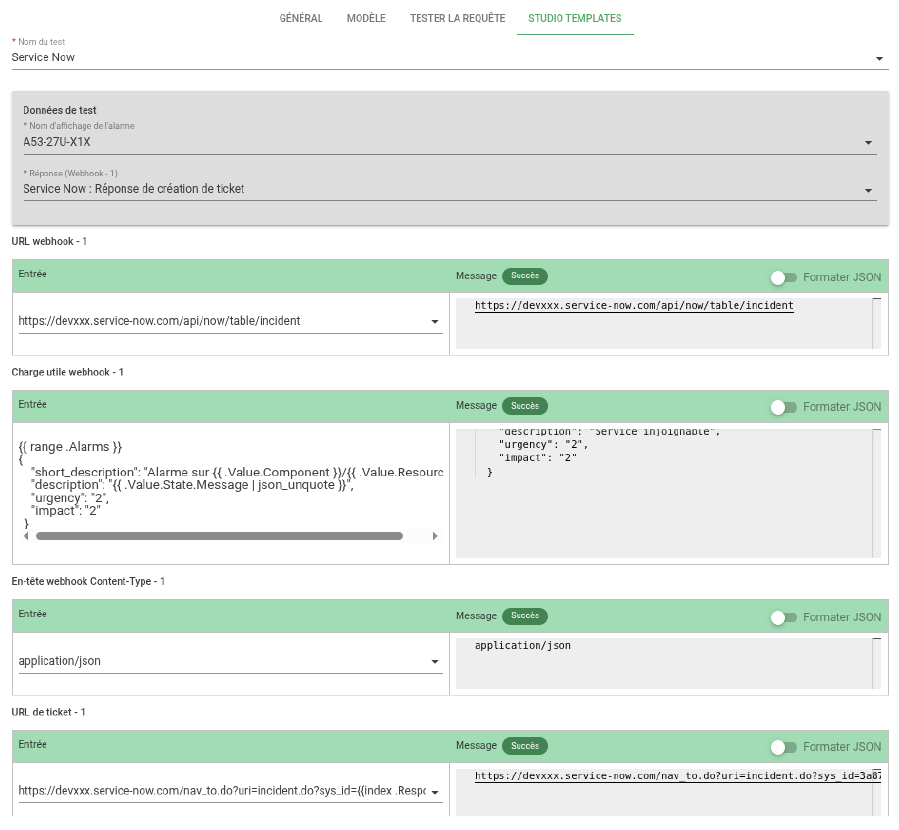
We then create a ticket declaration rule in Canopsis. In the Template Studio tab, we run the test by first selecting the Service Now response. This reveals all the variable values present in our template: URL, Payload, ticket management…
The Template Studio is a perfect illustration of the Canopsis philosophy: to provide simple, yet structuring, features that make a real difference to the day-to-day work of operating teams.
No more endless test loops, blind modifications or side effects discovered too late. With a dedicated environment, controlled data and immediate rendering, Template Studio puts teams back in control – even before configuration hits production.
It’s not a revolution. It’s better than that: it saves time, avoids errors and makes configurations more reliable, right from the very first deployment.
If you’re already using templates in Canopsis, the Template Studio will simply save you time. Want to find out more? Visit the official documentation or contact our experts!