
Second article on Canopsis interconnections dedicated to notification. After Teams, it’s the Gotify integration’s turn to be scrutinized!
Monitoring tools enable incidents to be detected quickly and their severity measured. Once an alert has been identified, the question arises of how to disseminate it… Should it be analyzed, shared, or simply notified to a specific person?
In certain contexts, particularly during on-call periods or outside working hours, the priority is above all to receive information immediately. This is where the integration between Canopsis and Gotify comes naturally.
What are Gotify notifications for?
Gotify is a push notification system that sends messages directly to a terminal, whether a cell phone or a browser. It stands out for its simplicity and its ability to transmit information without depending on a collaborative tool or active consultation of an interface.
This broadcast mode is particularly suitable when you want to :
- Quickly report a situation requiring special attention
- Guarantee receipt of information, including when on-call
- Reach a specific person or group, without overloading other players
The notification then becomes a clear signal, immediately visible, inviting you to act or to consult the details.
Simple integration with Canopsis
On the Canopsis side, the sending of a Gotify notification is controlled by a scenario, triggered by a specific event, such as the activation of an alarm. The scenario calls the Gotify API and transmits a structured message.
This approach enables the message content to be adapted to the context: summary message, explicit level of seriousness, link to Canopsis for further information if necessary.
A concrete example: filesystem full or machine unreachable
Take two common operating situations, for example:
- A filesystem reaching a critical occupancy threshold
- A machine that becomes unreachable due to a network outage or hardware failure
In Canopsis, these situations are represented by technical alarms, associated with infrastructure components or services. A scenario (payload available in appendix) is configured to react to the activation of these alarms, particularly when criticality is high.
When a filesystem exceeds a critical threshold or a machine stops responding, Canopsis triggers the scenario and immediately sends a Gotify notification to the person on call.
The notification received contains the essentials:
- The nature of the incident (filesystem full, host unreachable)
- The name of the machine or resource concerned
- Severity level
- Link to Canopsis to view the alarm
In short, the message enables the person notified to quickly understand the situation and decide what action to take: free up disk space, restart the service, investigate the network…
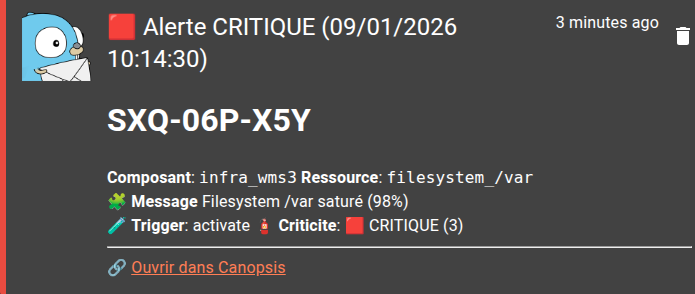
A complementary channel to monitoring
In conclusion, Gotify is not a substitute for hypervision or other means of communication. It is a complementary channel, particularly relevant when speed and reliability of notification are paramount, for example during on-call periods.
Combined with Canopsis, Gotify enables you to distribute the right information, at the right time, to the right people.
Payload scenario for Gotify notification
{
   "title": "{{ if eq .Alarm.Value.State.Value 3 }}🟥 Alerte CRITIQUE{{ else if eq .Alarm.Value.State.Value 2 }}🟧 Alerte MAJEURE{{ else if eq .Alarm.Value.State.Value 1 }}🟨 Alerte MINEURE{{ else }}🟩 Fin d'alerte{{ end }} ({{ .Alarm.Value.CreationDate | localtime "02/01/2006 15:04:05" }})",
   "priority": {{ if eq .Alarm.Value.State.Value 3 }}10{{ else if eq .Alarm.Value.State.Value 2 }}8{{ else if eq .Alarm.Value.State.Value 1 }}5{{ else }}1{{ end }},
   "message": "# {{ .Alarm.Value.DisplayName }}\n\nComposant: {{ .Alarm.Value.Component |json_unquote }}\nRessource: {{ if .Alarm.Value.Resource }}{{ .Alarm.Value.Resource }}{{ else }}N/A{{ end }}\n\n🧩 Message\n{{ .Alarm.Value.Output |json_unquote }}\n\n🧪 Trigger: {{ .AdditionalData.Trigger }}\n🧯 Criticite: {{ if eq .Alarm.Value.State.Value 3 }}🟥 CRITIQUE (3){{ else if eq .Alarm.Value.State.Value 2 }}🟧 MAJEURE (2){{ else if eq .Alarm.Value.State.Value 1 }}🟨 MINEURE (1){{ else }}🟩 OK (0){{ end }}\n\n---\n🔗 [Ouvrir dans Canopsis]({{ .Env.CanopsisURL }}/alarms/{{ .Alarm.ID }})",
   "extras": {
      "client::display": { "contentType": "text/markdown" },
      "client::notification": {
         "click": { "url": "{{ .Env.CanopsisURL }}/alarms/{{ .Alarm.ID }}"
         }
      }
   }
}